Project Details
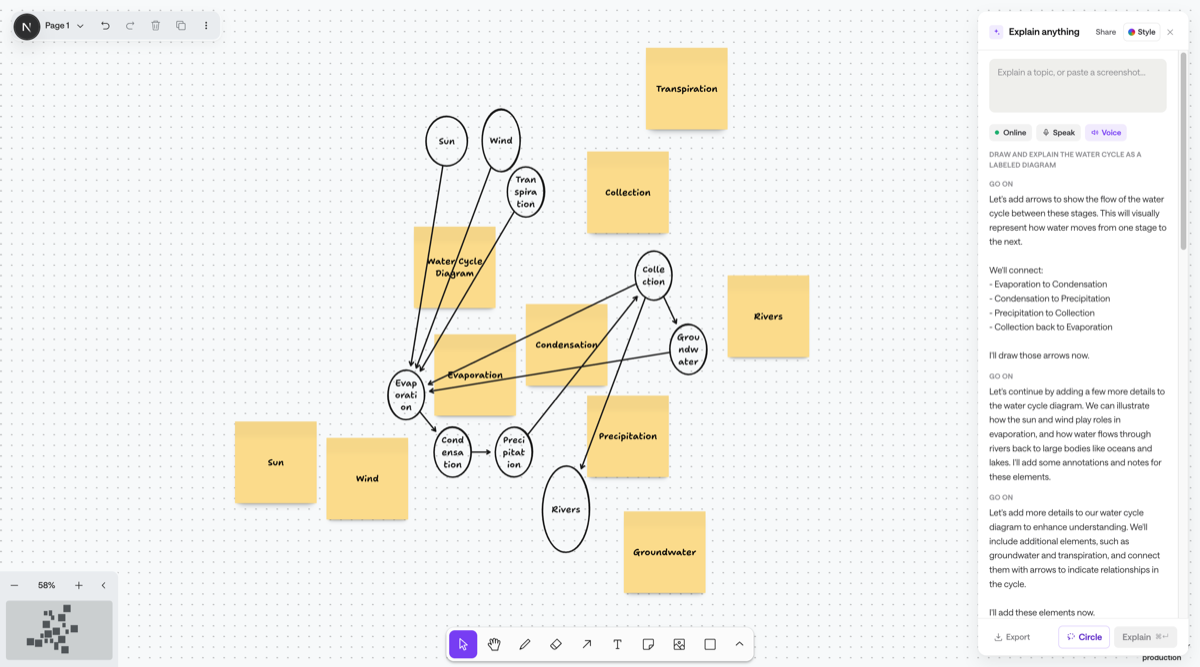
Chalk is an infinite whiteboard that explains things by drawing them. You give it a topic, a screenshot, or a region you circled, and it draws the explanation live — notes, diagrams, arrows, real charts and graphs — instead of answering in a paragraph.
It runs on tldraw for the canvas and Gemma 4 via Ollama as the core reasoning engine, with OpenAI and Claude behind the same tool-calling adapter as configurable alternates.
The core idea
The model doesn’t generate pixels. It calls tools — add_note, add_shape, add_arrow, add_chart, place_image, annotate — and those calls stream onto the canvas one at a time, visibly drawing rather than appearing all at once. That masks model latency and, more importantly, it means the board is a real scene graph. The AI can read an existing board’s state and continue building on it, so a session reads as one continuous whiteboard instead of a pile of disconnected answers.
Features
- Grounded accuracy — for anything precision-sensitive (anatomy, maps, real software UI) the model fetches and places a real reference image rather than freehand-drawing something that has to be factually correct
- Circle-to-explain — paste a screenshot, lasso any region, and get a focused explanation annotated right at that spot; the crop is taken at full resolution and sent back for a second pass
- Voice — narrates notes and annotations aloud as they’re drawn, pausable mid-sentence, and accepts spoken topics
- Multi-language, with Nigerian languages — Pidgin, Yoruba, Igbo and Hausa — prioritised in the picker
- Timeline scrubber — every session’s tool-call sequence is stored as a timeline, so you can scrub back and forth through it or export the whole thing as a narrated video, off the same data structure
- Online / offline — online runs Gemma 4 through Ollama Cloud, offline runs a local Ollama install with no internet needed after setup
- Clicky mode — a browser extension that explains whatever is on screen in place, on a hotkey, without switching tabs
What I built
- The canvas application and the tool-call → tldraw shape pipeline, including overlap avoidance so streamed shapes don’t collide
- Custom tldraw shapes for charts (Recharts), function plots with tangents and derivatives (
mathjs, noeval), and matrix operations - The shared model adapter so Gemma, OpenAI and Claude all drive the same tool schema
- Session and timeline persistence, the scrubber, and shareable replay pages
- Deterministic video export — Playwright replays the timeline at controlled pacing, ffmpeg encodes it, OpenAI TTS narrates
- The Electron desktop build and the Manifest V3 browser extension
Notes
Screen capture is hotkey-triggered only — never always-on. That was a deliberate scope decision rather than a missing feature: it’s the first thing anyone in IT or security asks about, and the answer needs to be simple.